Development Blog for ecoplus
A Portfolio Development – Protect the Earth Challenge Project
Prologue – Initial Thoughts
Posted on 19 Oct 2021
When I read about the challenge statements, I was nervous but intrigued by the many possible challenges that I could be working on. I took a breather and read through the case studies and then wrote down some rough ideas for each of them. From there, I looked at my options. I picked Protect the Earth because I once saw a video about implementing Augmented Reality(AR) and 3D models to websites. I felt that this could be a stand out feature of the project.
When I hopped on to the Protect the Earth MSTeams channel, I was excited about working on the challenge but at the same time worried as I was unsure about the team that I was going to work with. I could only hope that when it came to ideation and after pitching my ideas, my team can become just as passionate as me or will take interest in this project.
Week 1 – Group Forming
Posted on 20 Oct 2021
I felt that the group formation activity was interesting but I disliked the randomness of it. I felt that we should be able to group ourselves before the selection of the challenge statement, then from there, we could have enough time to discuss each of our strengths and weaknesses and get a better idea of the group abilities and decide which solution is suitable. I felt that we rushed that crucial part.
Despite that, I was one of the few that wrote a rough description of my pitch idea and then I spotted some familiar names that liked my idea. From there, I decided to form a group based on those that are interested. Even though we were from the same class, I had rarely talked to some of them and for others, it was my first time working with them on a development project.
Naturally, we discussed our roles and I took up the role of Scrum Master due to having a clearer idea of how the project will look like at the end of the development life cycle. Unlike some other teams, our team comprises mainly people with a coding background which is advantageous for us.
Group created:
Chew Kah Seng (S10208180) (Scrum Master)
Goh Wei Chong (S10204647) (Developer)
Lai Wai Keat (S10203389) (Developer)
Swan Htat Aung (S10205678) (Developer)
Xavier Ang Yan Jun (S10203108) (Developer)
Week 1 – Ideation
Posted on 22 Oct 2021
On the 22nd of October, we held our first meeting and then discussed and brainstormed some solutions for the problem statement. Each of us pitched our ideas and then settled with my idea to match volunteers and organizations for environmental causes. In addition, we also wanted to educate people about the current environmental issues the world is facing.
Then, we talked about building a website as the whole team was familiar and strong in making websites. Not only that, websites are easily accessible to a lot of devices which allows us to reach out to more people. There are also lots of research materials available online. Then, we shortlisted the list of features that we plan on implementing into the website and to differentiate ourselves from other websites, we will be implementing AR into our project. To do this, we will be using Google’s model viewer which renders 3D assets and allows mobile users to render the asset in an AR environment.
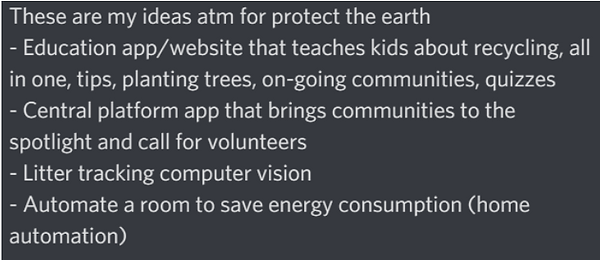
*Me sharing my ideas with my teammates in our discord channel
Week 2 – Planning and Storming
Posted on 27 Oct 2021
In this meeting, we went through the User Interface (UI) design, task delegation and naming of the project.
We used Figma to collaborate and standardize the look and feel of the website and to also see how each feature would be represented on the website.
Then, we moved on to the delegation of implementing each feature to each team member. For me, I will be handling the AR rendering as it was my suggestion and I had already done the research, I will also be working on the home page and communities page.
After delegation, we moved to finalize the project’s name. This was where we had our first “conflict” of interest, for disclosure, the discussion was handled well and calmly. However, this discussion did take about an hour as we brainstormed and generated numerous environmental-like names. The majority of our group wanted to use “seed seed”. However, I heavily opposed this suggestion as, in my opinion, it sounded too bland. Nearing the end, while designing the UI, we wrote the suggested names to see which looked great on the website. While designing we tried “eco++” which was inspired by C++ and then I suggested spelling it out instead which we finally landed on “ecoplus”.
During the conflict resolution survey, I learnt that I was a Fox, which means that I would likely resort to compromising on something when resolving a conflict. I think this trait has surfaced but given the nature of software development, I think that it is natural that in some cases we will have to resort to compromise. I was aware of this and made it clear to my teammates that if we have to, we will have to discuss the reasons behind it and what we can do about it afterwards.
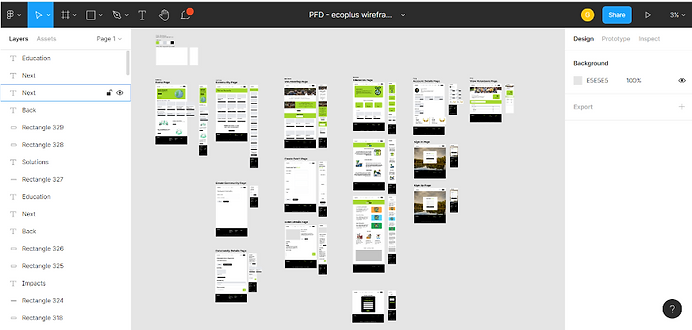
*Working on our wireframe on Figma for the initial website design
Week 2 – Consultation and Technology Usage Discussion
Posted on 29 Oct 2021
On the 29th of October, we took the chance to consult with Mr Peter Hung about our progress and showed what we have done and planned so far. We told him about our idea, its features, the UI design and the technologies we plan on using.
For my side, I shared about the use of AR technology for added interactivity on our website and how I will be using Google’s model-viewer Application Programming Interface(API) to render those 3D assets and how it can then be projected as AR on mobile devices. Users can also move and spin around the model to view it from all angles. I have also stated the purpose of this feature which is to make education fun and an interactive experience instead of a wall of text which some users, especially young children, may find boring.
The project was green-lit for each feature by Mr Peter Hung and was given positive feedback.

*Demonstration of Augmented Reality Model
of a Reactor to represent Green Technology
Week 3 (3 - 5 Nov) – Hackathon Preparation and Inception Deck
Posted on 5 Nov 2021
For this week, we met face to face during class and discussed the technologies that we will use which are TailwindCSS for styling, supabase as our database and the framework which is vanilla javascript.
We also worked on and completed our inception deck on Google Slides and wireframe on Figma. From there, we are left with our individual work to code out the HTML and CSS for each of the respective UI page designs.
The scope of the inception deck was large and we knew we had to start early. As for the wireframe, in my opinion, I felt that everyone’s design was clear and well thought out. I made minimal changes after reviewing their design and notified the changes I made to their UI.
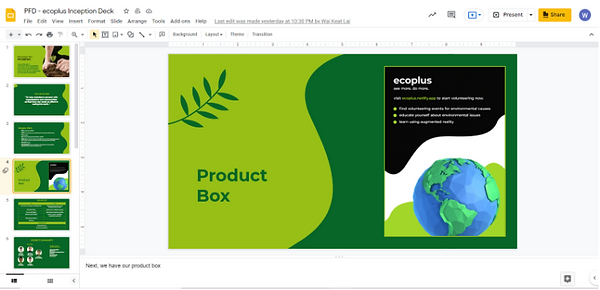
*The Product Box slide of our Inception Deck
Week 4 (10 - 12 Nov) – Pre-Hackathon Checks
Posted on 12 Nov 2021
As this week was our online week, we held a short meeting to discuss our progress. As for my work, I showed that I had completed my Homepage, View Community Page and did the Community creation, details and join pages and also demonstrated how to use the AR. Then I mentioned that I am left with the integration of the database to the UI. As for the rest of the team, the majority of them had completed their UI, so we spent the rest of the time helping each other out.
Nearing the end of the week, Xavier published the website and set up the database, hence, we started with the integration of the database to our UI. Then, we also started to merge our branches so that all of us can access each of the UI that we had created. During this time I also review each of of the team's web page styling and also integrate a navigation bar so that everything is interlinked to one another. After that, I cleaned up the javascript code from myself and my teammates. We had made a lot of progress and are ready to focus on optimizing and testing our code during the Hackathon.
I felt that we had prepared well for the Hackathon and that it was mainly working on getting a production-level website working and ready for release. I was surprised that all of my team members managed to finish their part of the project.
Week 5 (17 - 19 Nov) – Hackathon and Retrospective
Posted on 19 Nov 2021
Day 1
We conducted our stand up meeting and as the Scrum Master, I briefly described to the team that we had to focus on the integration of each of our work together. As for me, I spent most of my time debugging the entire project, finding any bugs that I come across from my testing and also restyled my team's UI so that we have a consistent UI theme throughout the website. I also helped each of my team members with troubleshooting their code.
Most of the time was spent on integrating the database to the UI. But we got most of the work done and ended off with a recap of what we have done and what we still need to do which is further integration and optimization of the code. I encountered a lot of bugs, but I was able to resolve them quickly. The challenge itself was debugging the whole website within that one Hackathon day.
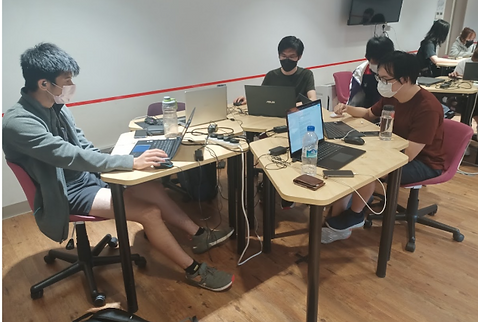
*The team hard at work resolving bugs
Day 2
We had encountered the stereotypical “Day before release” disaster, we had initially planned for Day 2 to be just testing and finding bugs, but we had encountered a big problem.
As Xavier was making backup SQL scripts in case if our tables in the database was for some reason ever wiped, we could recover and set them up easily. But while doing so, he also changed some of the column names of the table to standardize. But due to this, we had to make several changes to our TypeScripts (which are the code to retrieve database from supabase) as it was coded to retrieve from a specific column from the database because of that it could not find the newly named columns. Hence, we spent the majority of the time on Day 2 trying to fix and refactor the problem.
Then, the rest of the day we continued with our initial plan, made sure everything ran well and documented our code. Upon reflection on this issue, I felt that by having a face 2 face session, I observed my team members reaction and found out the problem in real-time and quickly step in to fix this issue. If this was done virtually, we could have potentially missed out on this issue and become very disorganized when resolving this problem. It could even have been accidentally left in the release product which can negatively reflect our progress. Therefore, I think face 2 face had shown its benefits.

*Our final supabase database

*A picture of us at the end of Day 2 Hackathon
Day 3
We presented our product to Mr Peter Hung and Ms Charis Tang. We shared our selling points and what we seek to achieve (which is to bring relevant information and a sense of urgency for people to act). I believe that we have brought that message across and have provided a suitable solution that brings social value. We had answered their queries with relevance and resolution. We hope that others can find our project useful and can share the same vision as us.
After the presentation, we conducted a sprint retrospective. We discussed what we can take away from this Hackathon experience. We talked about improving our communication as the database refactoring could have been avoided if Xavier had talked about the renaming of the table column names beforehand but we had also agreed that we were able to deliver our prototype on time with all of its essential functions working and celebrated that we cleared about 21 User Stories and made significant progress.
Then we discussed the future of the project. We brainstormed a couple of new user stories that we have already put in our Trello Board Backlog and are excited to work on them for the next sprint. We plan on elaborating more on our website and polishing other aspects of the website
The Hackathon was mainly about debugging and integration of the back-end to the front-end. We did encounter a big problem which is revisiting some of the code due to the table column name changes in the database, but we managed to resolve them before showing our product.
Now that Hackathon is over, I felt that I had contributed a lot to the project, both in terms of code contribution, feature implementation as well as communication between my teammates. I believe that I had contributed above average but I am also satisfied with my team's contribution. I know that not everyone is willing to pull several all-nighters to do the project but I was not expecting that.

*Updating our Trello Board
Week 12 (Jan 5 - 7) -
Discussion about the next step
Posted on 9 Jan 2022
This week, we took the time to discuss, and plan out the improvements that we would like to implement into our prototype during assignment 2.
We brainstormed various ideas but since we took into consideration the limited time we had, we focused our ideas on two kinds of topics. Which are improvements in operations and user experience.
Firstly, we looked at our previous backlog of assignment 1 and decided that we needed to elaborate more on the management operations that each role (volunteers, organizations and communities) can do. We noticed that we had only done the foundation which was creating then displaying the details of these roles. Hence, we wanted to elaborate more by providing more operations to these roles. Thus, we listed out to edit, and delete operations for these roles.
As for me, I added that for the community role, I will need to take into consideration there will be two types of roles in a community which is the community member and owner. These two roles will have different operations available to them when viewing the community details.
As for the education side of the project, Wei Keat suggested that he wanted to add a recycling topic to the education section to which I agreed as this is like a call to action to visitors and how they can do something simple that can contribute to a greater cause. This concluded what we wanted to do for the next 2 weeks, which included the development of each of our individual features testing and finally reviewing one another.
This concluded the discussion about the direction we wanted to take for assignment 2 which is in general to look into elaborating more on our existing features instead of adding more but with no substance. Then on the 5th of January, during our face to face session with Mr Peter Hung, we shared with him the direction we had set out to do, by which he agreed and said it was sufficient enough for this assignment 2.
Following that, we wrote out our plan on Trello Board with these new features as user stories and put them on our backlog.

*Updating our Trello Board for
3rd Sprint
Week 13 (Jan 12 - 14) - Sprint 3 Edit and Delete Operations
Posted on 15 Jan 2022
This marks the start of sprint 3. I started with implementing the edit community view which will retrieve and plot the existing data of the respective community. During this time, I had to explore different ways of transferring data when switching between pages on HTML. This is where I applied what I had learnt from my WEB development module and used URL queries to pass data between different views.
I had trouble updating the data through the edit typescript function as, for some reason, our database did not accept or update accordingly when I had clicked on the submit button. After a while of experimenting, I discovered that I had to change it into a form page instead as this would trigger a POST request that resulted in finally being recognized by our database.
After this had been completed, I moved on towards adding the delete function for community, now I had to consider making one where users choose to leave a community. This would result in deleting an entry from the communities_users table. Another consideration I had to add was if the owner of the particular community wants to delete the community itself.
Hence, I made it so that the website would check if the owner_id matched the logged-in user. By which, if it is not the owner, and the user is also in the community, then they would be given the leave community option. Otherwise, if the user is the owner, then they are given the delete community option.
This was not the end however, after coding the delete options, I needed to add a text input that requires the user to enter the name of the particular community as verification that they want to delete the community.
Another factor to consider was the remaining redundant information on other tables in the database as once a community has been deleted there would be other records that take the community id as a foreign key which means that there would be a relation between the two records. Hence, I needed to code the delete function in such a way that it deletes all the other tables that have the same community id before deleting the community itself.
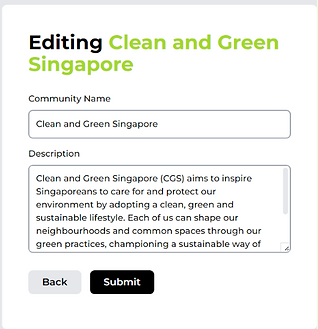
*Editing of community
During our face to face session, we held a short stand up meeting, where I informed my teammates that I had already completed the delete and edit function for the community side and that they could refer to my code when doing similar operations for their side.
Furthermore, during the meeting, Xavier informed the group that the uploading of images has been implemented on supabase and there was an example that we can take from which is the user profile images.
After I got back home from the face to face session, I got started with the custom image upload for the community pages.
I managed to understand the function of Xavier’s code and added more by customizing it to cater for community cover and profile images. This way it builds on the custom image function instead of blindly copying it.
I did have some troubles with the custom image function as I also learnt that I needed to verify and authenticate using the logged-in session token just like Xavier’s code to upload any images to the database. I am not sure why but it may be a rule set by supabase. Following that, I manage to separate profiles and cover images by folders which I can retrieve from the URL. This works and communities now can upload custom images to add individual identification.

*Community Cover and Profile Images
Week 14 (Jan 19 - 21) - Review and Sprint 3 Retrospective
Posted on 22 Jan 2022
This was the second week of sprint 3, since I had completed my work early, I started to review and debug some of my teammates' work.
Since Wei Chong asked for my help for the edit and delete function earlier in the week, I went and explored his code to which I made some corrections and was able to get it working. He had a similar problem which was using the click button instead of submitting a form and the other program did not include the deletion from other tables when deleting the event, hence, I had to inform him about it.
Furthermore, during this time, I also found some bugs regarding my cover and profile images, since, during development, I assumed that the user may upload both at the same time, but did not account for if the user only uploaded one of the two. For example, the user only uploads the profile image for the community but leaves out the cover profile. This is where I discovered visual bugs relating to this which I simply added a div to account for this.
Following this, we had a sprint retrospective. We managed to complete all the features for the sprint and wanted to look towards what to do for the next sprint. We wanted to focus on improving the user experience of the website due to two factors.
Following our general goal of this assignment, which is to elaborate on the implementations, one of the considerations was if the user was unhappy with the experience of the website, they will simply leave as they might not be satisfied with the product, hence, we wanted to find ways to make our website easy to use.
The other consideration was that we needed to create user stories that were independent of one another as we were approaching a very busy next 2 weeks with a lot of assignments to manage on top of this project. By having independent user stories, we can manage our work independently while doing other assignments.
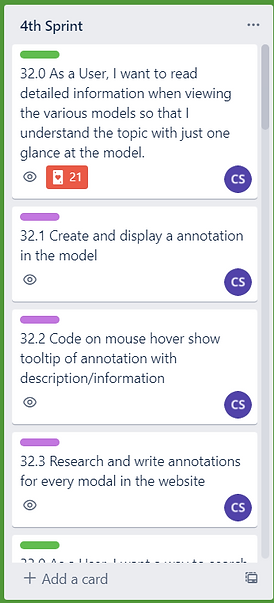
*Updating our Trello Board for Sprint 4
Week 15 (Jan 26 - 28) - Sprint 4 User Experience
Posted on 29 Jan 2022
This is the start of sprint 4, where we would be focusing on user experience improvements. For me, I would be working on adding detailed annotations to the model viewers, an upcoming events page and a community search.
The detailed annotations were the most time sink during this sprint compared to the other two tasks. Particularly the global model, as I need to spend time referencing the model with Google Earth’s model then compare where the countries were.
Since this model was a polygon designed, it did not match well with the real globe. Hence, I needed to roughly estimate where the country would be but still take reference from the actual location. I could have changed the model but it would not be consistent with the other models on the website as other models had a sort of cartoonish look to them.
Another problem was learning and relearning the x, y and z coordinates for each model as each model was somewhat different, when plotting the coordinates for the annotations it was very messy as some models had different coordinates. Hence, I needed to do trial and error to find patterns to eventually get the annotations where I wanted them to be.
Lastly, some models did not support annotations. This was the most frustrating problem that I encountered while adding annotations as when I try to plot the coordinates, it would just not move from a certain point. Hence, I believe that the models just did not support annotations. This results in scouring the internet, trying to find similar-looking models while also considering the particular model that would be a good fit for the rest of the website.
I had to resort to changing one model completely which was the renewable energy section under the education solutions page. This model went from a solar panel to a wind turbine which still fits the topic of renewable energy and also supports annotations.
Following that, the events page and community search was not a problem as I simply used typescript functions to retrieve the necessary information and plot it onto the respective web pages.
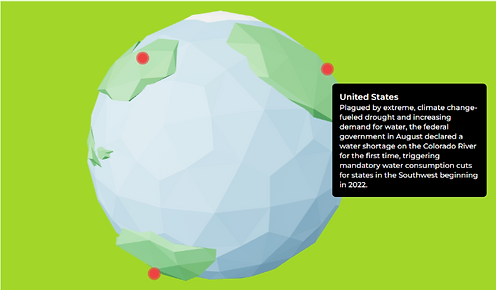
*Detailed annotations on a globe model
Week 16 (Feb 2 - 4) - Review and Debugging
Posted on 5 Feb 2022
This was the second part of Sprint 4 since I had again completed my work early and informed my team during our standup meeting. I went to help and review my teammates' code and test their functions.
Due to the limited time I had because of other assignments, I mainly focused on improving the account functions for this review.
As Aung had trouble with the forgot password function, I decided to help him with that part. I referenced the supabase reset password documentation and realized that we needed to create two pages which are the forget password and reset password pages. Following the instructions, after the user has requested to forget password by inputting their email address. They would receive an email address that would redirect them to the website with a recovery token in the URL.
This is where the problem starts, since we only knew about the URL query, we thought that it was a URL query, and then realized that when parsing over as a query, it was not recognized by JavaScript. This is where we researched and found that it is instead known as a hash due to the token starting with the # symbol. After finding and implementing the javascript code that recognizes hash type information from the URL, we finally got the recovery token. After which, this would redirect the user to the reset password page and they could finally be authenticated to reset their password.
This came to the end of the review and after a couple more hours of debugging and testing the various features, we submitted our project for this assignment.

*Supabase Reset Password Documentation

*Forget Password Function
Week 17 (11 Feb) - Project Presentation
Posted on 11 Feb 2022
The presentation went well, we presented the overview of the project as well as described what we had done for assignment 2 as well as the process and considerations made along the way. We also managed to answer all the questions from Mr Peter Hung such as the reasons behind choosing technologies like TailwindCSS and also about our experience with difficulties with agile. Furthermore, Mr Peter Hung also gave positive feedback about the work done which we appreciated the feedback.

*A picture of us after the presentation
Conclusion and Reflection
Posted on 12 Feb 2022
Looking back, I had learnt a lot from the explorative nature of this project. From exploring various solutions, experimenting with new technologies, different from the ones we had learnt from our previous modules but learning through applying similar concepts while at the same time managing a team through sprints.
I had solved numerous problems ranging from myself and also my team’s problems. Furthermore, the challenge with time-boxed sprints made me adapt and learn about my capabilities as an individual and what I can do in a given time frame.
I even got to implement Web Augmented Reality into the project which is very rare in a lot of other similar web applications. Hence, I believe that this project experience is unique as we were able to solve the challenge statement while being valuable experience in working with a scrum team. This experience has taught me a lot about myself about being both a developer and a scrum master which is a valuable experience to add to my portfolio.